

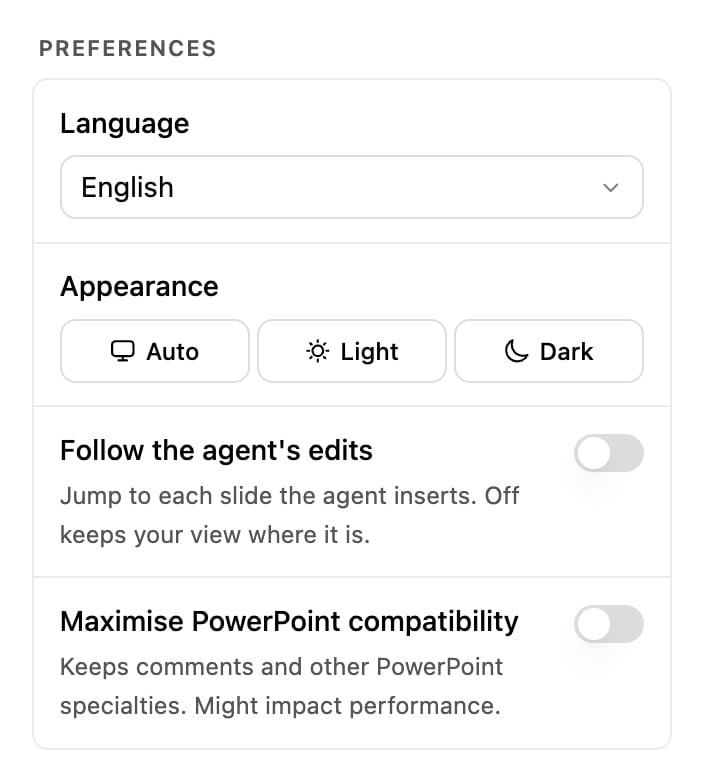
The Preferences section of the settings drawer.
Follow the agent’s edits
On, PowerPoint jumps to each slide as Pretty inserts or changes it, so you watch the work land. Off, your view stays where you put it and slides change behind you. Turn it off when:- You are editing one slide by hand while a chat builds others.
- Pretty is drafting a long deck and the jumping is making it hard to read anything.
- You are presenting or screen-sharing while a chat runs.
Maximise PowerPoint compatibility
This setting exists to keep your comments. Off, Pretty writes only the parts of the deck it understands, and comment threads on a slide it edits can be lost. On, Pretty carries every PowerPoint feature it does not itself use through each edit, so comments, and other PowerPoint specialties such as tracked detail, stay exactly where they were. The cost is speed, because every write carries more of the file. If a comment has ever disappeared after a Pretty edit, turn this on. It is the most common cause.Open settings, scroll to Maximise PowerPoint compatibility, and switch it on.
Replay onboarding
Runs the welcome questions again, the short “Let’s get you set up.” flow from your first sign-in. It does not reset anything else: your chats, components and skills are untouched.Account
Below Preferences in the same drawer.Related
Tour the task pane
Every section of the settings drawer, in order.
Security and privacy
What the add-in can access, and what we do with your data.